
From a Cabinet Vision project to a signed quote. In the same sitting.
A pricing system for the cabinet industry: set the price list once, and it reads every project straight out of the Cabinet Vision database and prices it on its own — cabinet by cabinet, door by door — into a quote that's ready to sign. When the job closes, the same data carries on into your ERP.
- 5
- priced categories per quote
- 3
- dimensions that set a price tier
- 11
- preconfigured ERP systems
- 1
- click to a finished Excel quote
Not a raw table. A quote you can send to a client as it is.
A real quote produced from a Cabinet Vision project: five categories each with their own subtotal, running meterage, VAT and a signature line. Only the client's details were replaced with demo values.
One price list — and every project prices itself.
Cabinet Pricer is a single workspace for pricing: the price catalog, the calculation engine, the quote archive and the ERP connection in one system. Set the rules once in the catalog editor, and every new project is priced on its own — without entering a single dimension twice.
Set the rules once. The system remembers them for good.
The catalog editor is the only place a price is decided. Everything below it — the pricing, the quote, the ERP hand-off — reads from here.
-
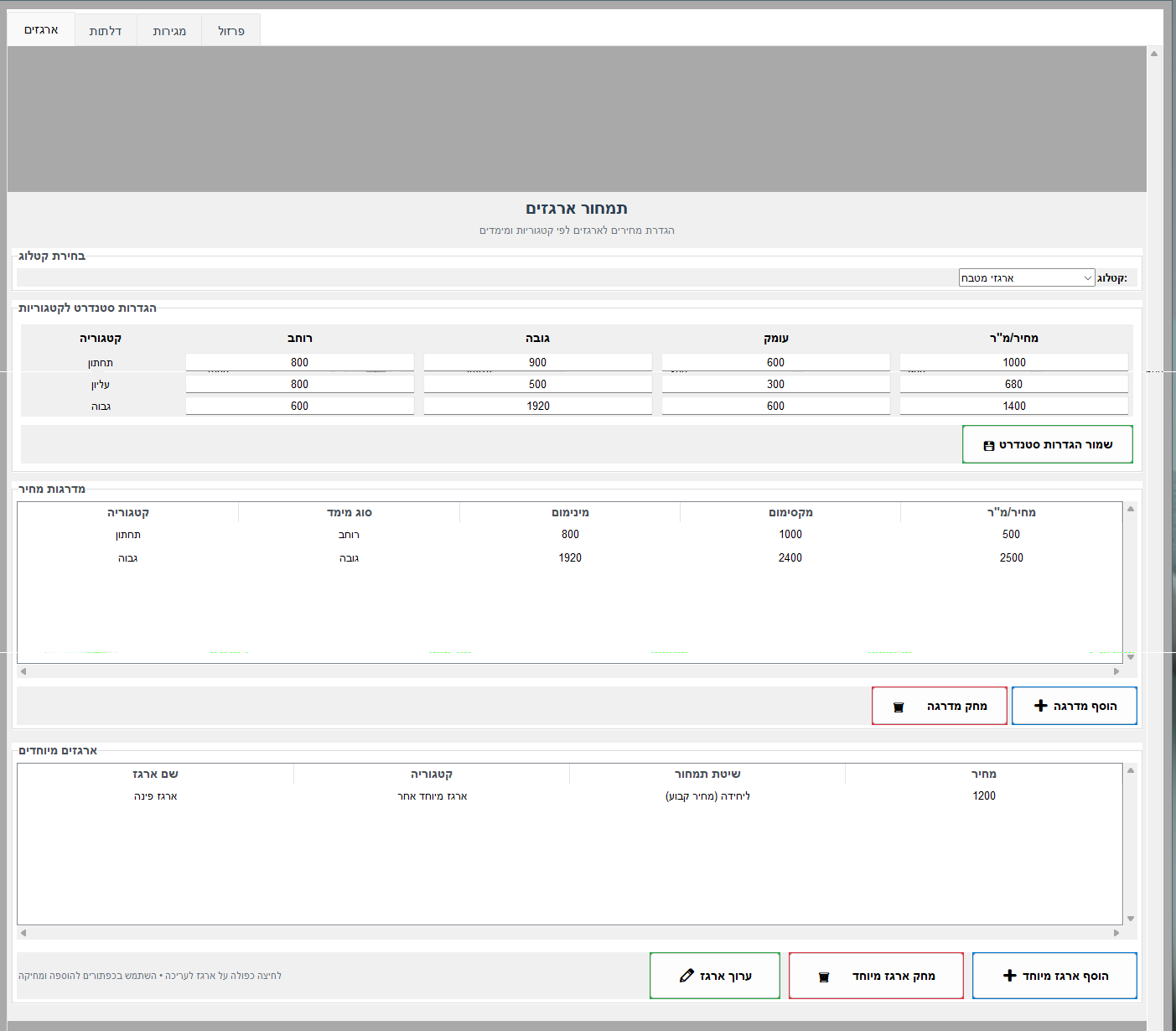
Standard settings for the three categories
Base, wall and tall — each with its own standard width, height and depth, and its own price per m².
-
Price tiers by dimension
Every tier is set on width, depth or height, with its own minimum, maximum and price per m² — so an unusually wide cabinet isn't priced like an ordinary one.
-
Special cabinets at a fixed price
A flap unit, an open unit or any other special cabinet gets its own pricing method and unit price, instead of being forced into a template that doesn't fit it.
-
Doors, drawers, hardware and accessories as separate layers
Finish and area for doors; brand and slide for drawers, with inner drawers counted separately; hardware priced per unit or per meter, the way the supplier actually sells it.
The system reads the project — and prices it on its own.
No export, no import: it opens onto the Cabinet Vision database and reads the job as it stands, with every cabinet, finish and piece of hardware in it.
-
Read straight from the database
A connection to Cabinet Vision's SQL Server — the project is read at the source, not from an intermediate file someone has to export and remember to refresh.
-
Filter by room
A multi-room job is priced room by room, and each room gets its own price lines in the quote.
-
Outliers get flagged, not swallowed
A cabinet outside the standard range is explicitly marked "non-standard" and priced separately — you see exactly what fell outside and why.
-
Anything without a price paints itself red
Every item not yet defined in the price list comes out as a red line at ₪0.00 — the quote never looks finished while a line is still missing.
-
A discount per line, and one on the total
A discount percentage per item, plus an optional discount on the grand total — without working the math backwards by hand.
Five categories, VAT and a signature line — in one click.
The quote comes out as a formatted Excel file, ready to print or send to the client on the spot. And every quote that ever went out stays within reach.
-
Five categories, each with its own subtotal
Cabinets, doors, drawers, hardware and accessories — every category totals itself before the grand total is built.
-
Running meterage and automatic subtotals
The cabinets' total meterage is counted as it goes, alongside the money — two numbers a fabricator needs anyway.
-
VAT, grand total and a signature line
The quote comes out ready to sign, not just priced — the VAT rate is set in the system and applied to the final amount.
-
An archive with search and filters
A list of every quote issued, searchable by date, job or client, with an automatic count of how many went out.
-
Open in Excel and print from the list
No hunting for the file on disk — open it or send it to the printer straight from the archive.
If you have an ERP, it has a connection.
This isn't an integration locked to one product: eleven systems arrive preconfigured, each with its own endpoint, fields and authentication method, and any other system connects through the same REST mechanism. Odoo and Monday.com are the ones running against a live customer today.
-
Eleven preconfigured systems
Odoo, Monday.com, SAP, Priority, Oracle, Microsoft Dynamics, Sage, NetSuite, QuickBooks, plus generic REST and SOAP for anything else.
-
Eight authentication methods
Bearer Token, API Key, Basic Auth and OAuth2, alongside dedicated sessions for SAP, Priority, Odoo and Monday — whichever your system requires.
-
Not just a number — a full workflow
Customers, jobs and line items are created in the target system, not one figure someone retypes by hand.
-
Field and unit-of-measure mapping
The headers and fields that get sent are controlled from inside the system and matched to your ERP's data structure.
-
Built-in connection test and diagnostics
A test button that says whether the connection works, and an error report that says what failed — no guessing why a send didn't land.
From the Estimator's Screen
More images and documents coming soon.
Not another pricing tool. The system that closes the gap between Cabinet Vision and the invoice.
Cabinet Pricer by Elsop — licensed to fit your team, distributed directly by Elsop.